
Introduction
KiCad is a free and open-source software suite for Electronic Design Automation (EDA). It enables users to design schematics for electronic circuits and convert them into printed circuit board (PCB) layouts. KiCad is widely used by hobbyists, students, and professionals due to its powerful features and active community support.
Features
-
Schematic Capture:
KiCad provides a comprehensive tool for creating electronic circuit schematics. Users can add components, wires, power sources, and labels to create clear and accurate circuit diagrams. -
PCB Layout Editor:
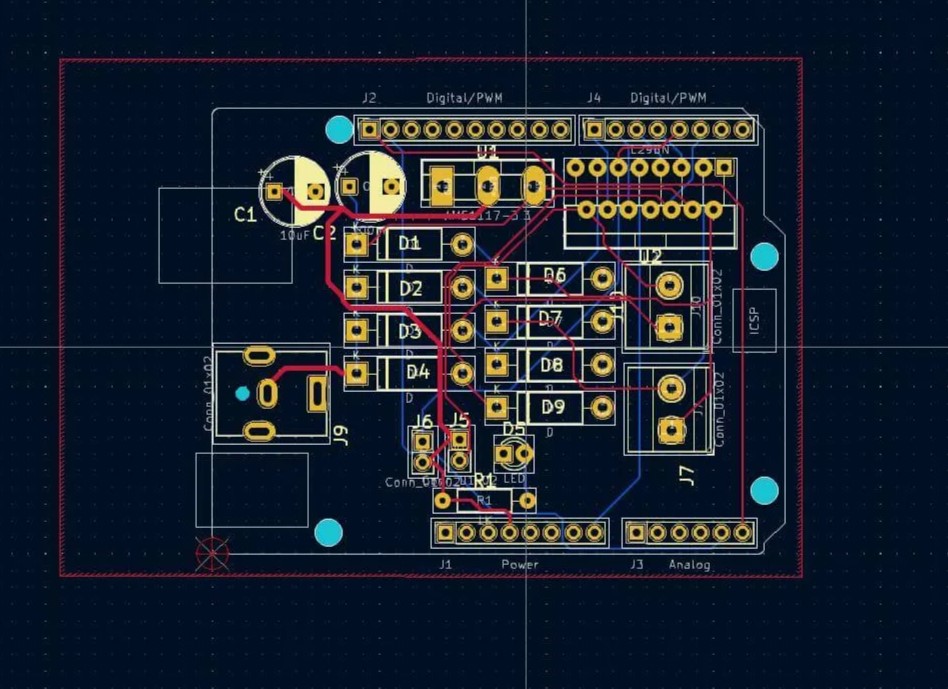
After making a schematic, users can design the physical layout of the PCB, placing components and routing traces. KiCad supports multiple layers and advanced design rules. -
Library Management:
KiCad includes extensive libraries of electronic components and footprints. Users can also create custom symbols and footprints as needed. -
3D Viewer:
The 3D viewer allows users to visualize the PCB in three dimensions, helping to catch design errors and verify the board’s appearance before manufacturing. -
DRC and ERC:
Design Rule Check (DRC) and Electrical Rule Check (ERC) help ensure that the schematic and PCB layout are free of common errors. -
Gerber File Generation:
KiCad can generate industry-standard Gerber files and other output formats required for PCB manufacturing.
Workflow
The typical workflow in KiCad consists of:
- Schematic Creation: Design the circuit in the schematic editor.
- Assign Footprints: Link schematic symbols to PCB footprints.
- PCB Layout: Place components and route traces in the PCB editor.
- Verification: Run DRC and ERC to check for design errors.
- 3D Visualization: Inspect the board in the 3D viewer.
- Export Files: Generate Gerber and drill files for manufacturing.
Advantages
- Open Source: Free to use, modify, and distribute.
- Cross-Platform: Runs on Windows, macOS, and Linux.
- Active Community: Extensive documentation, forums, and tutorials.
- No Limitations: No restrictions on board size, layer count, or number of components.
Use Cases
- Designing hobbyist electronics projects.
- Educational purposes and coursework.
- Professional PCB design for prototyping and production.
Getting Started
To start using KiCad:
- Download it from kicad.org.
- Install and explore the schematic and PCB editors.
- Refer to the official Getting Started Guide for tutorials.
Conclusion
KiCad is a versatile and powerful EDA tool suitable for a wide range of users. Its open-source nature and robust feature set make it a popular choice for anyone interested in PCB design.
 Minimalism
